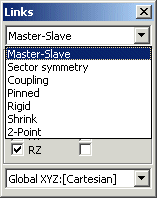
- Master/slave links are used to force nodes to share degrees of freedom. For example, you can force the X displacement of one node to be the same as the X displacement of another node. Master/slave links may be applied in the global Cartesian system or in any user-defined coordinate system (UCS).
- Sector symmetry links may be used to model structures exhibiting repeated symmetry conditions. An example is a multi-blade fan. Such a structure is not axisymmetric, but there exists a repeated sector symmetry in the geometry. Using sector symmetry links, only one sector needs to be modelled for simulating many loading and vibration conditions.
- Coupling links provide an alternative way of connecting dissimilar elements. For example, a beam element may be connected to a 2D plane stress element by coupling the rotational degree of freedom on the beam (bending) to two translational degrees of freedom on the plane stress elements.
- Pinned links are similar to rigid links except that they couple only the translational degrees of freedom.
- Rigid links are used to rigidly connect nodes together. Both translations and rotations may be coupled, selectively. For modelling rigid diaphrams on specific planes (e.g the floor of a building), automatic tools are available to assign the rigid links, create the master node and set the required degrees of freedom.
- Shrink links provide a way of modelling interference or shink-fits. Simply identify the relevant edges or surfaces and the link enforces the appropriate constraint.
- 2-Point links enforce a constraint equation between two nodes.
- Attachment links provide a way of easily connecting dissimilar elements; for example, connect a beam end to the face of a plate or brick, or a plate edge to the face of a brick, or two sets of elements with incompatible divisions.
- Multi-point links offer the advanced user the possibility of specifying arbitrary relationships between any number of nodes and degrees of freedom.
|

 Menu
Menu