Preferences: Backups and Saving
Description
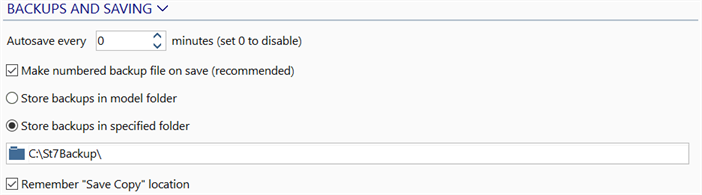
Autosave every xx minutes
Sets a number (in minutes) to specify how often Strand7 should automatically save the current working file.
This function is useful when working on a large model as it reduces the possibility of data loss due to system crashes. To disable autosave, set a value of zero.
Note that autosave will only save a file if changes have been made - if no further changes are made, the file will not be saved again by AutoSave no matter how long the file remains open.
Make numbered backup file on save (recommended)
If set, every time Save in Strand7 Menu: Saving is used, a copy of the saved model is made and placed in the backups folder. The backup copy takes the same name as the current model with numerical order as suffix. This option also applies to the Autosave option (i.e., when Autosave is triggered, the working file is saved and a numbered back is made).
Store backups in model folder / Store backups in specified folder
This controls where the numbered backup files are stored.
If stored in the model folder, a sub-folder called _St7Backup will be created within the folder that contains the model file (if not already there) to store the backup file.
If stored in a specifed folder, the backup file is saved in the nominated specified folder.
Select Location

Displays the Select Path dialog, which allows you to navigate to and name a location.
Right-click to go to the location in the file explorer. See Strand7 Interface: Right-click Functions.
Remember "Save Copy" location
If set, the location previously used by Save Copy in Strand7 Menu: Saving becomes the default location for the next Save Copy operation. If not set, the default location for a Save Copy operation is the same as the location of the model file being saved.
Use factory defaults
Sets all settings to the factory defaults. This function is available by clicking the BACKUPS AND SAVING header.
See Also