Entity Display Settings: Load Path Display
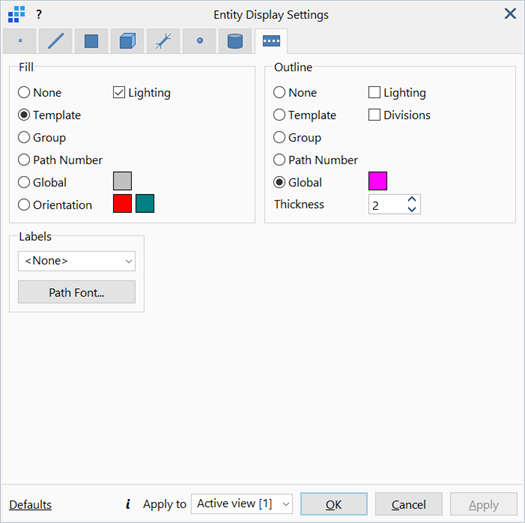
Description
Configures the parameters associated with the display of load paths.
Dialog
Fill / Outline
The fill and outline colours of the load paths drawn.
-
None
Does not draw the fill/outline of the load paths.
-
Template
Renders the fill area or draws the outline of load paths according to their respective load path template colours, as set under LAYOUTS: Paths.
-
Group
Renders the fill area or draws the outline of load paths according to their respective group colours, as set under Global: Groups.
-
Path Number
Renders the fill area or draws the outline of load paths according to their respective path number; i.e., one unique colour for each load path.
-
Global
Renders the fill area or draws the outline of load paths with a specified colour, regardless of their respective templates or groups.
To change colour, click the adjacent colour square to open the Colour Selection dialog, then select or define a colour.
-
Orientation
Renders the fill area at the +z and -z surfaces of load paths with +z and -z colours respectively.
To change colour, click the adjacent colour square to open the Colour Selection dialog, then select or define a colour.
-
Lighting
If set, lighting effects defined under View Options: Drawing Tab are applied to the fill area or outline of load paths.
-
Divisions
If set, displays internal outlines indicating the number of divisions and spacing between division lines.
-
Thickness
The weights of the drawing outlines.
Labels
Displays number labels of selected type next to the load paths.
-
Path Font...
Opens the Settings: Font Selection dialog to adjust the font type, size, style and colour of the displayed labels.
Common Controls
See Also