Contour Configuration: Limits Tab
Description
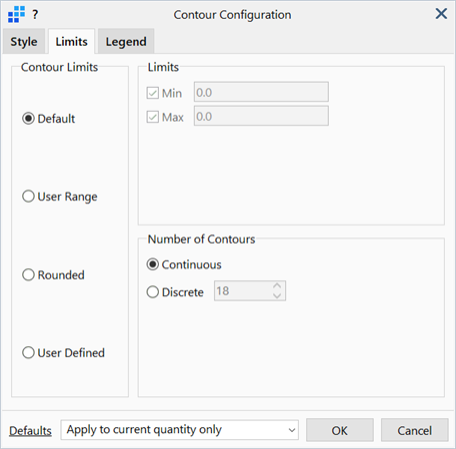
Configures contour limits and the number of contours.
Dialog
Contour Limits
-
Default
Sets the contour limits to the true result limits of the displayed entities.
-
User Range
Sets the contour limits to user specified values.
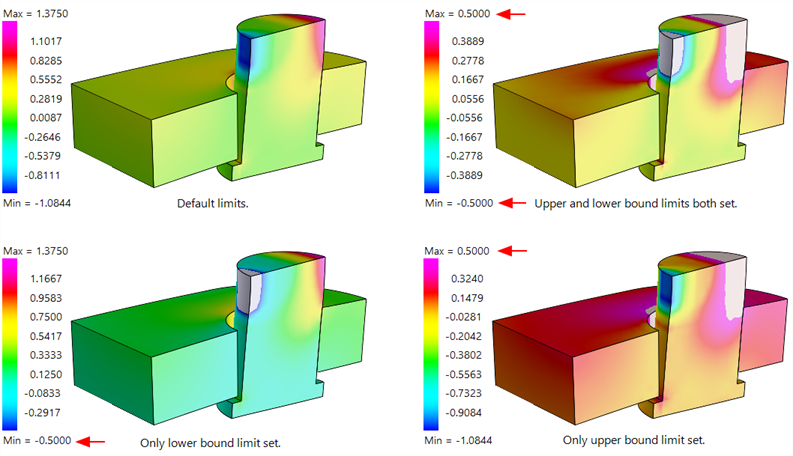
Either or both limits (Min, Max) can be set depending on the state of the checkboxes. If a limit is set, the value entered becomes the limit on the legend. If a limit is not set, the default value remains on the legend. This allows for limits to be placed on both ends or just one end of the legend.
When limits are set and an entity's result exceeds that limit, the entity will be contoured according to the > Max and < Min colours defined on the Style tab, depending on which limit has been exceeded.
-
Rounded
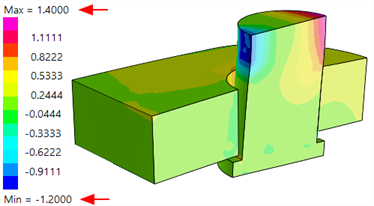
Sets the contour limits to a rounded range bounding the true result limits of the displayed entities. Usually the rounded limits will be slightly higher than the true maximum and slightly lower than the true minimum.
-
User Defined
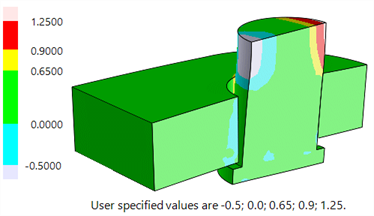
Sets each band of the contour according to a list of user-specified values. The number of contour bands is determined by the number of user-specified values. The specified values must be separated by the separator character indicated. They do not need to be in any particular order.
Number of Contours
The number of result bands for contour.
-
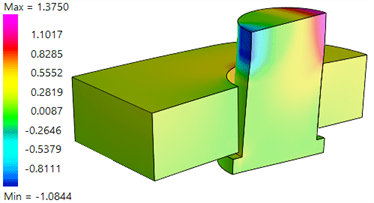
Continuous
Sets the colour of each pixel according to its continuously interpolated position within the contour range. There will be no distinct boundary between colours or contour levels.
-
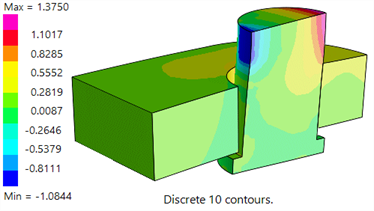
Discrete
Sets the number of contour bands to a user-specified value; the colour of each pixel is then based on the band in which the pixel lies. There will be distinct boundaries between colours or contour levels.
Apply to current quantity only
If selected, applies the settings only to the current result quantity for this entity (e.g., displacement, effective stress).
Apply to all quantities for this entity
If selected, applies the settings to the all result quantities for this entity (e.g., displacements, stresses) for the current entity.
Common Controls
See Also