Selection Functions: Select Connected Entities
Description
Selects a series of entities that are topologically interconnected to a specified master entity. The allowable connection distance is defined via a proximity rule.
There are two sets of potential topological interconnections:
- Node and element connections: any entity in the set of node, beam, plate, brick or link can act as the master entity with which to select any other interconnected entities in this set. Entities in this set cannot act as master entities for the selection of connected vertices or faces.
- Vertices and faces: either of vertex or face can be used as the master entity to select interconnected vertices and faces. Vertices and faces cannot act as master entities for the selection of interconnected node, beam, plate, brick or link entities.
Dialog
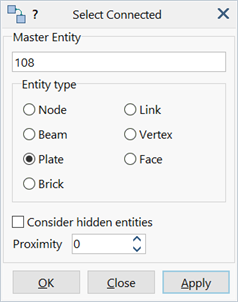
Master Entity and Type
The entity number and type defines the master entity.
The entity number can be typed directly into the edit box, or it can be retrieved by clicking an entity in the model window. When retrieving the entity number from the model window, only the entity numbers for the specified Entity type can be retrieved (for example, if Entity type is set to Plate, only plate element numbers can be retrieved as the master entity).
Consider hidden entities
If set, entities not currently displayed will be considered when determining whether an entity is interconnected to the master entity.
If not set, hidden entities acts as breaks in the connection list - a broken connection due to hidden entities does not allow the connection to progress beyond the break.
Irrespective of this setting, hidden entities are never selected, they can only be used to bridge or break a connection.
Proximity
Specifies the maximum topological distance between the master entity and interconnected entities. An entity is selected when it is connected (directly or indirectly) to the master and its proximity is no greater than the proximity setting.
Proximity is defined as follows:
- An entity directly connected to the master entity is at a proximity of 2.
- An entity that is indirectly connected to the master entity by a third entity that connects both, is at a proximity of 3, and so on.
In the image below:
- Plates 1 and 2 are directly connected and therefore they have a proximity of 2.
- Plates 2 and 3 are indirectly connected, via plate 1 (or via plate 4), and they have a proximity of 3.
- Plate 2 is also directly connected to plate 4, and therefore they have a proximity of 2.
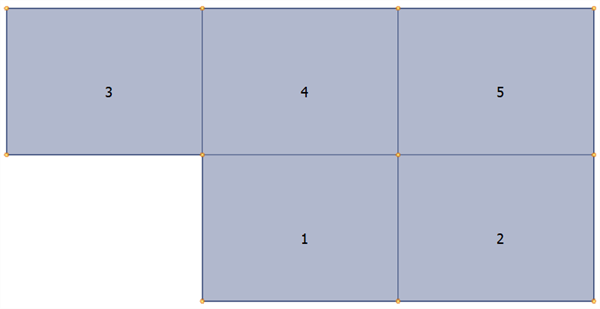
Any single entity has a proximity of 1 with itself.
If the proximity value is set to 0, the allowed proximity is assumed to be infinite, and therefore all interconnected entities are selected.
If the proximity value is set to 1, only the master entity can be selected because a single entity has a proximity of 1 only with itself.
Consequently, no matter what the proximity setting is, the master entity will always be selected.
See Also