Move Tools: by Thickness
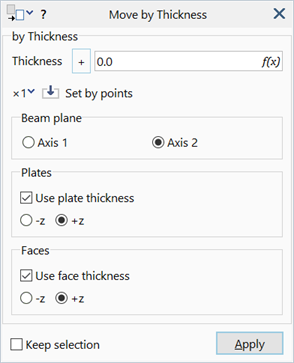
Description
Moves selected beams, plates and geometry faces in the thickness direction.

For positive values of thickness, plate and geometry faces are moved in the direction of the local +z axis, and beam elements are moved in the positive directions of the principal 1 and 2 axes. For negative values, entities are moved in the opposite direction.
Dialog
Thickness
The move increment in the thickness direction.
Flip Sign + / -
Switches the direction of the move, effectively flipping the sign of the thickness value.
Set by points (×1 / ×2 / ×3 / ×1/3 / ×1/2)
When the thickness is obtained using Set by points, the thickness is multiplied by the selected scaling factor before the value is placed in the edit box. Changing the scaling factor affects only subsequent thickness retrievals, not the current thickness showing in the edit box. The scaling factors are not applicable to thickness values typed directly into the edit box.
Beam plane Axis 1 / Axis 2
The direction of the move for beam elements, either the principal 1 or principal 2 axis.
Use plate thickness -z / +z
If set, the thickness value for moving plate elements is taken from the plate property or plate thickness attribute, if assigned. The thickness value specified in the dialog is ignored.
The move can be made in either the -z or +z directions of the selected plates.
Use face thickness -z / +z
If set, the thickness value for moving geometry faces is taken from the plate property referenced by the face, or the face thickness attribute, if assigned. The thickness value specified in the dialog is ignored.
The move can be made in either the -z or +z directions of the selected faces.
Common Controls
See Also