Move Tools: Move Vertices vs Move Geometry
A move action applied to vertices is generally different to a move action applied to geometry faces or geometry edges. All of these move actions have their uses, but their outcomes can be different.
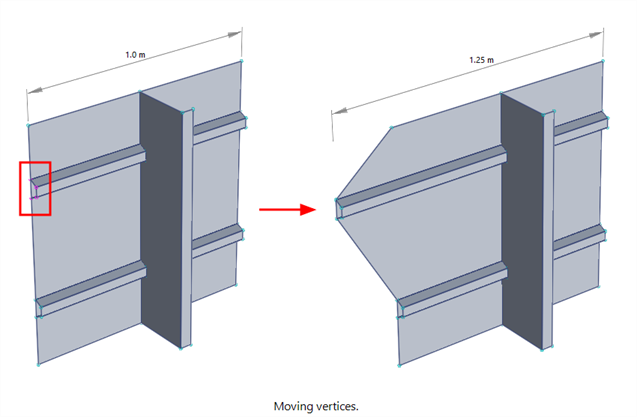
When vertices are moved without selecting geometry, the faces and/or edges connected to those vertices remain connected and are therefore dragged along with the moved vertices. This applies no matter how many vertices on a geometry face are moved.
In the image below, four vertices are selected and moved. All faces that reference those vertices are affected by the vertex move operation.
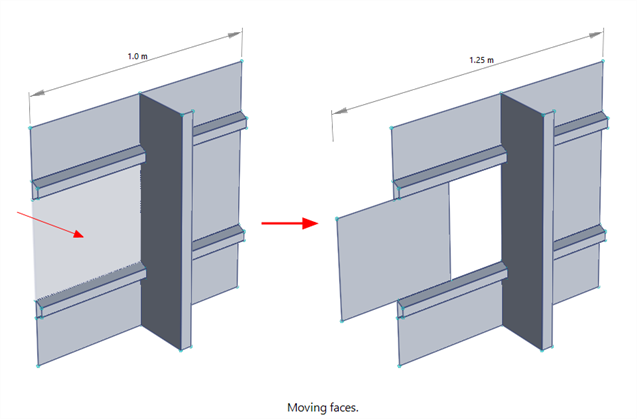
In the image below, just one face is selected – no vertices are selected. The move operation detaches that face from the connected faces and moves just the selected face.
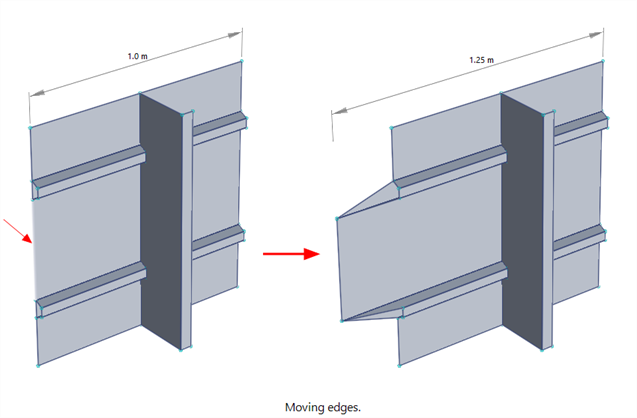
In the image below, just one edge is selected – no vertices are selected. The move operation moves the vertices on the selected edge so that the result is the same as selecting just the vertices on the edge. Moving an edge is effectively a convenient way of moving the vertices on that edge. Note that if all edges of a face are selected, the operation is not the same as selecting the face; selecting the face detaches the face before moving it, whereas selecting the edges moves the vertices on the edges.
See Also